HP 15.6" ZBook Studio x360 G5 2-in-1 Mobile Workstation 32GB RAM 1TB SSD
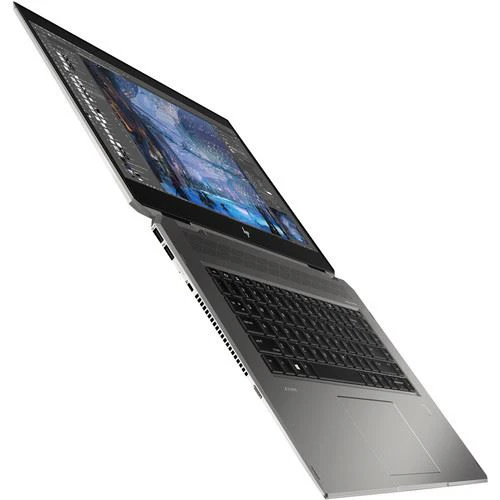
 This ZBook Studio x360 features a 15.6" IPS display with a UHD 4K 3840 x 2160 screen resolution, LED backlighting, a 16:9 aspect ratio, 400 cd/m2 brightness, a 1200:1 typical contrast ratio, a refresh rate of 60 Hz, 282 ppi, and viewing angles of 85/85/85/85°. The display also features multi-touch functionality, allowing you to utilize the touch gestures and functions in Windows 10 Pro to further improve accessibility and productivity, and is protected by Corning Gorilla Glass 3. The dedicated NVIDIA Quadro P2000 graphics card has 4GB of discrete GDDR5 RAM and delivers a sharp, clear picture. You'll be able to output video to an external display at resolutions up to 5120 x 2880 using the system's HDMI 2.0 and dual Thunderbolt 3 ports, the latter of which supports DisplayPort 1.3.
This system is powered by a 2.3 GHz Intel Core i9-9880H Eight-Core processor, which allows you to run multiple applications simultaneously. If you need more power, the system can be overclocked to 4.8 GHz using Intel Turbo Boost 2.0 technology. The 32GB of 2666 MHz DDR4 RAM helps to ensure smooth multitasking and also allows the computer to quickly access frequently-used files and programs. For storage of your files, this ZBook Studio x360 is equipped with a 1TB NVMe PCIe M.2 SSD.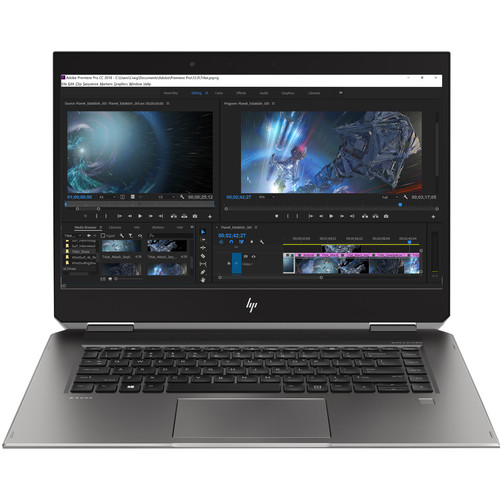
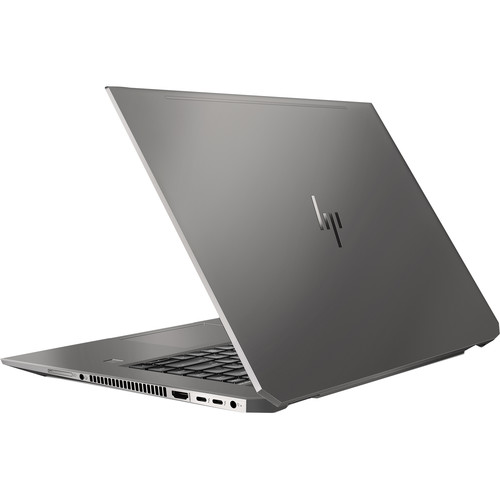
If you want to add external storage, optical drives, memory card readers, and more, the ZBook Studio x360 offers two 40 Gb/s Thunderbolt 3 ports that also support 10 Gb/s USB 3.1 Gen 2 Type-C, plus two USB 3.1 Gen 1 Type-A ports, one of which doubles as a charging port. 802.11ac dual-band Wi-Fi is built-in for wireless networking and Bluetooth 5.0 technology will allow you to connect additional compatible peripherals. Content from memory cards may be accessed via a built-in SD/SDHC/SDXC card reader that supports UHS-II media, and other integrated features include a user-facing 720p IR webcam for face authentication with Windows Hello, dual-array microphones, and dual stereo speakers custom-tuned by HP and Bang & Olufsen.
HP's 15.6" ZBook Studio x360 includes the ZBook Studio x360 pen with a USB Type-A to Type-C charging cable, four POM and six Elastomer replacement nibs, and a replacement tip tool, Windows 10 recovery media, a 150W Slim Smart AC adapter that supports HP Fast Charge and operates using 100-240 VAC at 47-63 Hz, plus an HP Long Life 6-cell / 95.6Wh lithium-ion polymer prismatic battery that lasts for around 10 hours before recharging is required, and typically recharges in 3-5 hours. The installed operating system is Windows 10 Pro (64-bit) and protection is provided by a limited 3-year warranty.
360° Pro Performance
Finally, a convertible laptop designed to tackle large files and run multiple apps with speed and responsiveness, allowing you to seamlessly edit or render high-res images.
Precision-Crafted Versatility
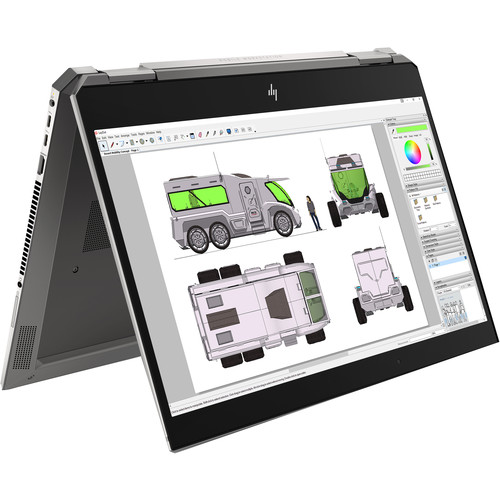
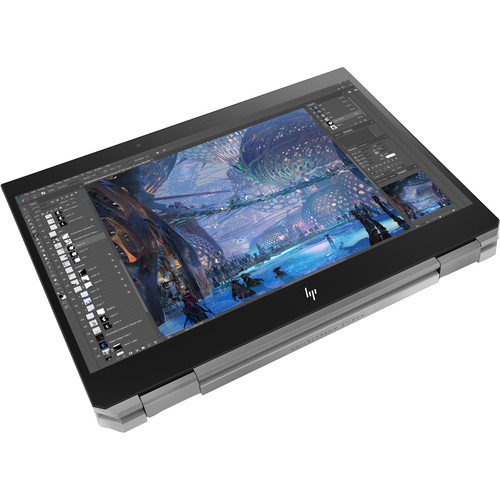
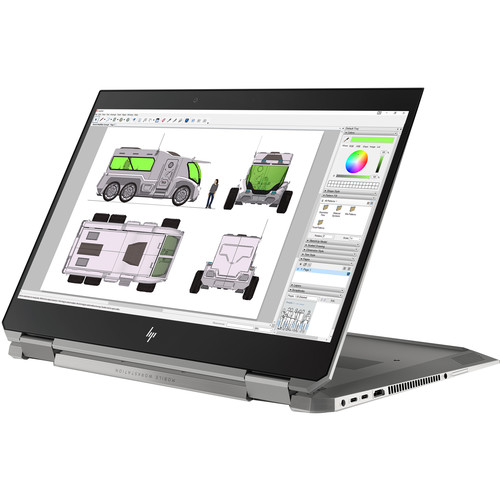
With HP's 360° hinge, you'll get the comfort of a laptop, the convenience of a tablet, and the luxury of additional modes to help you showcase your work.
Pixel-Perfect Tools
Achieve inking precision with 4000 levels of pressure sensitivity and tilt with the included ZBook x360 pen.
Thunderbolt 3
Thunderbolt 3 is a hardware interface that utilizes the reversible USB Type-C connector. Doubling the speed of its predecessor, Thunderbolt 3 features a maximum throughput of 40 Gb/s when used with compatible devices. The connector also transmits data via USB 3.1 at up to 10 Gb/s, and dual-bandwidth DisplayPort 1.3 allows you to connect up to two 4K displays simultaneously. Additionally, you can daisy chain up to six devices from a single Thunderbolt 3 port.
USB 3.1 Gen 1 Type-A Ports
This ZBook Studio x360 features two USB 3.1 Gen 1 Type-A ports that will allow you to connect external peripherals such as additional storage, optical drives, printers, memory card readers, and more. One of these ports also doubles as an always-on charging port for compatible USB devices.
Up to 64GB Memory
While this system natively includes 32GB of 2666 MHz DDR4 RAM in a 2 x 16GB configuration, it can be upgraded to a maximum of 64GB when 32GB memory modules are used in each of the system's two 260-pin SO-DIMM slots
802.11ac Wi-Fi
The system uses Intel Dual Band Wireless-AC 9560 which is compatible with 802.11a/b/g/n/ac (2x2) Wi-Fi so that users may access network connectivity using wireless technology.
Bluetooth 5.0
Additional compatible peripherals, such as mice, keyboards, headsets, and more may be paired using Bluetooth 5.0 technology
720p IR Camera
- IR camera for face authentication with Windows Hello
- HD format (widescreen)
- Supports videoconferencing and still image capture
- A high-quality fixed focus lens
- Video capture at various resolutions up to 1280 x 720 (720p) and up to 30 fps
- M-JPEG compression supports higher frame rates for video capture and videoconferencing
- Improved low light sensitivity
- Improved dynamic range
DisplayPort 1.3 Protocol Features Supported on Thunderbolt 3 Ports
Legacy displays (HDMI, DVI, and VGA) may be attached to the Thunderbolt port with the use of a certified dongle
- DisplayPort monitors capable of supporting DisplayPort 1.3 may be directly attached to the Thunderbolt port to achieve HBR2 with the use of a dongle
- Thunderbolt 3 monitors may be directly attached to the Thunderbolt port to achieve HBR2 and MST
- DisplayPort 1.3 MST feature ("daisy-chain" feature) is supported through the Thunderbolt 3 port on Thunderbolt 3 devices or DisplayPort 1.3 monitors (requires monitor with DisplayPort 1.3 MST capability) with the use of a dongle
- Up to 2 streams (eight lanes) of DisplayPort 1.3 are supported over a single Thunderbolt 3 port. Up to two 4K displays 24-/30-bit color depth at 60 Hz or one 5K display are supported over a single Thunderbolt 3 port. An Intel-certified Thunderbolt cable is required
- DisplayPort 1.3 w/MST (Multi-stream Transport) supports resolutions up to Full 4K, 24-/30-bit color depth at 60 Hz, and WUXGA (1920 x 1200) monitors, 24-/30-bit color depth at 120 Hz
Multi-Display Support without the HP Thunderbolt Dock G2
The HP ZBook Studio x360 with hybrid graphics and without the use of the ZBook dock supports up to a maximum of three independent displays. These three displays are the internal panel plus two external displays connected to two of the three following ports: HDMI 2.0, Thunderbolt 3, and Thunderbolt 3. The HP ZBook Studio x360 configuration with integrated Intel graphics and without the use of the ZBook dock supports up to a maximum of three independent displays via any three-display combination of the system panel, HDMI, Thunderbolt 3, and Thunderbolt 3.
Multi-Display Support with the HP Thunderbolt Dock G2
The HP Thunderbolt Dock G2 has a Thunderbolt 3 port, a VGA port, two DisplayPort 1.3 ports, and a USB Type-C port. When used together with the HP ZBook Studio x360 configuration with hybrid graphics, a maximum of five independent displays are supported. These five displays are the internal panel and four external displays connected to the ZBook Dock's Thunderbolt 3, VGA, and two DisplayPort ports. When used together with the HP ZBook Studio x360 configuration with Intel integrated graphics, a maximum of 3 independent displays are supported via any three-display combination of the system panel, system ports, and ZBook Dock ports.
Original: $3,203.50
-70%$3,203.50
$961.05


Description
This ZBook Studio x360 features a 15.6" IPS display with a UHD 4K 3840 x 2160 screen resolution, LED backlighting, a 16:9 aspect ratio, 400 cd/m2 brightness, a 1200:1 typical contrast ratio, a refresh rate of 60 Hz, 282 ppi, and viewing angles of 85/85/85/85°. The display also features multi-touch functionality, allowing you to utilize the touch gestures and functions in Windows 10 Pro to further improve accessibility and productivity, and is protected by Corning Gorilla Glass 3. The dedicated NVIDIA Quadro P2000 graphics card has 4GB of discrete GDDR5 RAM and delivers a sharp, clear picture. You'll be able to output video to an external display at resolutions up to 5120 x 2880 using the system's HDMI 2.0 and dual Thunderbolt 3 ports, the latter of which supports DisplayPort 1.3.
This system is powered by a 2.3 GHz Intel Core i9-9880H Eight-Core processor, which allows you to run multiple applications simultaneously. If you need more power, the system can be overclocked to 4.8 GHz using Intel Turbo Boost 2.0 technology. The 32GB of 2666 MHz DDR4 RAM helps to ensure smooth multitasking and also allows the computer to quickly access frequently-used files and programs. For storage of your files, this ZBook Studio x360 is equipped with a 1TB NVMe PCIe M.2 SSD.
If you want to add external storage, optical drives, memory card readers, and more, the ZBook Studio x360 offers two 40 Gb/s Thunderbolt 3 ports that also support 10 Gb/s USB 3.1 Gen 2 Type-C, plus two USB 3.1 Gen 1 Type-A ports, one of which doubles as a charging port. 802.11ac dual-band Wi-Fi is built-in for wireless networking and Bluetooth 5.0 technology will allow you to connect additional compatible peripherals. Content from memory cards may be accessed via a built-in SD/SDHC/SDXC card reader that supports UHS-II media, and other integrated features include a user-facing 720p IR webcam for face authentication with Windows Hello, dual-array microphones, and dual stereo speakers custom-tuned by HP and Bang & Olufsen.
HP's 15.6" ZBook Studio x360 includes the ZBook Studio x360 pen with a USB Type-A to Type-C charging cable, four POM and six Elastomer replacement nibs, and a replacement tip tool, Windows 10 recovery media, a 150W Slim Smart AC adapter that supports HP Fast Charge and operates using 100-240 VAC at 47-63 Hz, plus an HP Long Life 6-cell / 95.6Wh lithium-ion polymer prismatic battery that lasts for around 10 hours before recharging is required, and typically recharges in 3-5 hours. The installed operating system is Windows 10 Pro (64-bit) and protection is provided by a limited 3-year warranty.
360° Pro Performance
Finally, a convertible laptop designed to tackle large files and run multiple apps with speed and responsiveness, allowing you to seamlessly edit or render high-res images.
Precision-Crafted Versatility
With HP's 360° hinge, you'll get the comfort of a laptop, the convenience of a tablet, and the luxury of additional modes to help you showcase your work.
Pixel-Perfect Tools
Achieve inking precision with 4000 levels of pressure sensitivity and tilt with the included ZBook x360 pen.
Thunderbolt 3
Thunderbolt 3 is a hardware interface that utilizes the reversible USB Type-C connector. Doubling the speed of its predecessor, Thunderbolt 3 features a maximum throughput of 40 Gb/s when used with compatible devices. The connector also transmits data via USB 3.1 at up to 10 Gb/s, and dual-bandwidth DisplayPort 1.3 allows you to connect up to two 4K displays simultaneously. Additionally, you can daisy chain up to six devices from a single Thunderbolt 3 port.
USB 3.1 Gen 1 Type-A Ports
This ZBook Studio x360 features two USB 3.1 Gen 1 Type-A ports that will allow you to connect external peripherals such as additional storage, optical drives, printers, memory card readers, and more. One of these ports also doubles as an always-on charging port for compatible USB devices.
Up to 64GB Memory
While this system natively includes 32GB of 2666 MHz DDR4 RAM in a 2 x 16GB configuration, it can be upgraded to a maximum of 64GB when 32GB memory modules are used in each of the system's two 260-pin SO-DIMM slots
802.11ac Wi-Fi
The system uses Intel Dual Band Wireless-AC 9560 which is compatible with 802.11a/b/g/n/ac (2x2) Wi-Fi so that users may access network connectivity using wireless technology.
Bluetooth 5.0
Additional compatible peripherals, such as mice, keyboards, headsets, and more may be paired using Bluetooth 5.0 technology
720p IR Camera
- IR camera for face authentication with Windows Hello
- HD format (widescreen)
- Supports videoconferencing and still image capture
- A high-quality fixed focus lens
- Video capture at various resolutions up to 1280 x 720 (720p) and up to 30 fps
- M-JPEG compression supports higher frame rates for video capture and videoconferencing
- Improved low light sensitivity
- Improved dynamic range
DisplayPort 1.3 Protocol Features Supported on Thunderbolt 3 Ports
Legacy displays (HDMI, DVI, and VGA) may be attached to the Thunderbolt port with the use of a certified dongle
- DisplayPort monitors capable of supporting DisplayPort 1.3 may be directly attached to the Thunderbolt port to achieve HBR2 with the use of a dongle
- Thunderbolt 3 monitors may be directly attached to the Thunderbolt port to achieve HBR2 and MST
- DisplayPort 1.3 MST feature ("daisy-chain" feature) is supported through the Thunderbolt 3 port on Thunderbolt 3 devices or DisplayPort 1.3 monitors (requires monitor with DisplayPort 1.3 MST capability) with the use of a dongle
- Up to 2 streams (eight lanes) of DisplayPort 1.3 are supported over a single Thunderbolt 3 port. Up to two 4K displays 24-/30-bit color depth at 60 Hz or one 5K display are supported over a single Thunderbolt 3 port. An Intel-certified Thunderbolt cable is required
- DisplayPort 1.3 w/MST (Multi-stream Transport) supports resolutions up to Full 4K, 24-/30-bit color depth at 60 Hz, and WUXGA (1920 x 1200) monitors, 24-/30-bit color depth at 120 Hz
Multi-Display Support without the HP Thunderbolt Dock G2
The HP ZBook Studio x360 with hybrid graphics and without the use of the ZBook dock supports up to a maximum of three independent displays. These three displays are the internal panel plus two external displays connected to two of the three following ports: HDMI 2.0, Thunderbolt 3, and Thunderbolt 3. The HP ZBook Studio x360 configuration with integrated Intel graphics and without the use of the ZBook dock supports up to a maximum of three independent displays via any three-display combination of the system panel, HDMI, Thunderbolt 3, and Thunderbolt 3.
Multi-Display Support with the HP Thunderbolt Dock G2
The HP Thunderbolt Dock G2 has a Thunderbolt 3 port, a VGA port, two DisplayPort 1.3 ports, and a USB Type-C port. When used together with the HP ZBook Studio x360 configuration with hybrid graphics, a maximum of five independent displays are supported. These five displays are the internal panel and four external displays connected to the ZBook Dock's Thunderbolt 3, VGA, and two DisplayPort ports. When used together with the HP ZBook Studio x360 configuration with Intel integrated graphics, a maximum of 3 independent displays are supported via any three-display combination of the system panel, system ports, and ZBook Dock ports.